 ospitessa

 Español
 Italiano
 Deutsch
 Français
 Português
 Ελληνικά
 Hrvatski
 Polski
 Nederlands
 Čeština
 Slovenčina
 Magyar
 Slovenščina
 Shqip
 Български
 Türkçe
 Română ↗ ospitessa.ro
 Austria
 Switzerland
 Belgium
 Ireland
 Malta
 Cyprus
 Montenegro
 Mexico
 Costa Rica
 Dominican Republic
 Panama
 Colombia
 Peru
 Ecuador
 Argentina
 Uruguay
The Home dashboard: your hotel at a glance, with AI that takes you where you need to go
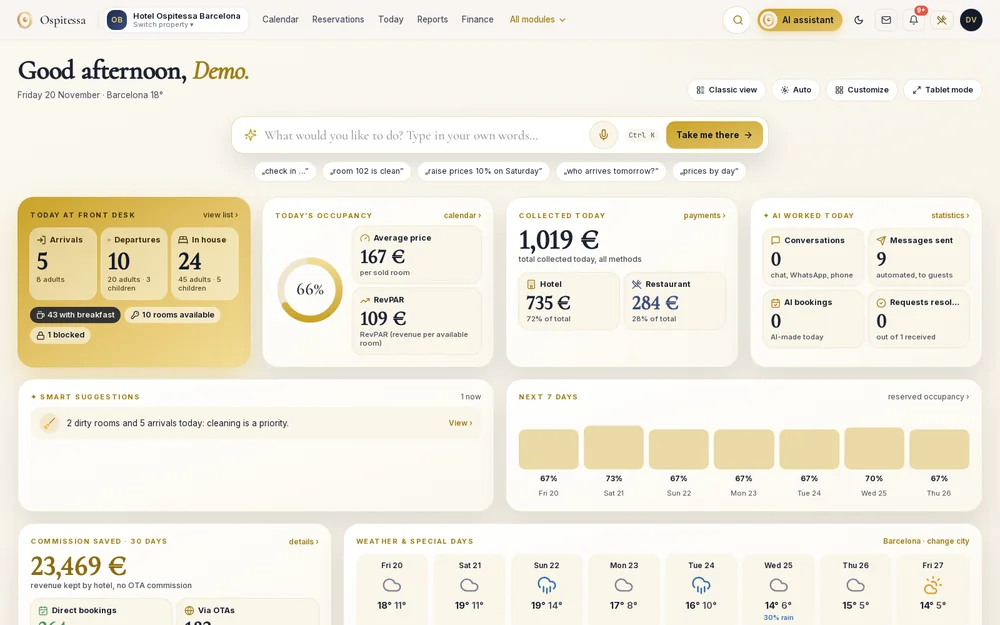
When you open Ospitessa, the whole day is on large cards: arrivals, occupancy, money, housekeeping and what the AI did. Type what you want to do in your own words and the app takes you there.
“What would you like to do?”
The bar in the middle of the dashboard understands everyday words: “prices by day”, “invoices”, “dirty rooms”. It opens the right page. A question such as “who arrives tomorrow?” goes to the AI assistant, which answers and shows you where to click. The same bar opens from any page with Ctrl+K (Cmd+K on a Mac).
Real commands, typed or spoken
The bar does the work, not just the navigation: “check in Weber”, “room 102 is clean”, “raise prices 10% on Saturday”, “close sales on the 24th”, “move booking 2104 to the 28th”, “invoice for Weber” (opens the booking’s folio, where you issue the invoice). If a name is misheard, the app suggests bookings with similar names. Tap the microphone and say it. The AI prepares the action and shows it on screen; it only runs after “Confirm”, with the user’s own permissions.
Your manager on WhatsApp
Every evening the owner gets the day on WhatsApp in a few lines: occupancy, takings, tomorrow’s arrivals and what the AI did. Below come only the things to decide, numbered: “1) Saturday is 92% full: raise price by 10%”. Reply 1, 2 or YES and it is done, with a confirmation. Without WhatsApp connected, the report comes by email.
Suggestions you apply with one click
The dashboard watches the coming days. When a day passes 85% occupancy it suggests raising the price by 10% and, once you confirm, sends the new rates to Booking.com, Airbnb and your other channels. It also tells you when dirty rooms clash with arrivals or when a day is too empty.
Commission saved
One card shows what direct bookings brought in over the last 30 days and how much commission the hotel would have paid if they had come through booking platforms. The owner sees, every day, the money that stayed with the hotel.
Each person arranges their own dashboard
Cards can be dragged with the mouse or a finger, moved with arrows and hidden. The front desk puts arrivals first, the manager the money, housekeeping the cleaning. The layout is saved for each user.
Night front desk and tablet mode
After 10 pm the dashboard switches to the dark theme by itself and keeps only what matters at night: arrivals, messages, what the AI did, housekeeping and the activity log. Tablet mode puts the dashboard full screen, with large, sharp cards that are easy to read from the desk.
Weather and special days
The 8-day forecast for the hotel's city and the country's public holidays appear on the dashboard and in the suggestions, so you can see why demand rises on certain days.
Questions about AI home dashboard
Can I go back to the old dashboard?
Yes. Under “Customize”, choose “Classic view”; you can switch back to the new dashboard at any time.
Is the price increase applied automatically?
No. The dashboard only suggests it. Rates change only after you press “Yes, apply” in the confirmation window.
Related features
 Team, security & appIn-app AI assistantAn AI assistant in the top bar that explains any page, answers "how do I..." and highlights the right button on screen.See the feature
 Front desk & bookingsHotel PMSCloud property management system with a room calendar, check-in, invoices, housekeeping and reports.See the feature
 ReportsReports and statisticsHotel pulse with a daily briefing and alerts, rate reports, availability, comparison with last year, revenue postings, top rooms, user log and AI statistics.See the feature

See Ospitessa on your own rooms.
In a 30-minute demo we show you the calendar, the channel manager and the AI receptionist set up for your property.