 ospitessa

 Español
 Italiano
 Deutsch
 Français
 Português
 Ελληνικά
 Hrvatski
 Polski
 Nederlands
 Čeština
 Slovenčina
 Magyar
 Slovenščina
 Shqip
 Български
 Türkçe
 Română ↗ Ospitara
 Austria
 Switzerland
 Belgium
 Ireland
 Malta
 Cyprus
 Montenegro
 Mexico
 Costa Rica
 Dominican Republic
 Panama
 Colombia
 Peru
 Ecuador
 Argentina
 Uruguay
Housekeeping on the housekeeper's phone
Each housekeeper opens "My rooms" on the phone and sees what to do today, in the order that matters: departures with same-day arrivals first, then early arrivals and VIP guests.
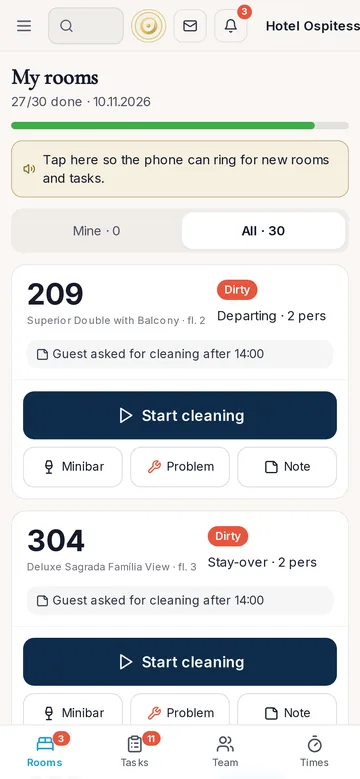
Big buttons, not forms
"Start cleaning" starts the timer and "Clean" closes the room. The supervisor marks it "Inspected" or sends it back with a reason, and the housekeeper gets a notification straight away.
Minibar, straight to the bill
The housekeeper ticks what was used and the amount goes onto the guest's bill, with stock taken from the store room. If the guest has already left, the front desk gets an urgent task so the charge is not lost.
One problem, one photo
A broken bulb, a dripping tap, a missing remote: the housekeeper takes a photo and sends it. Maintenance gets a task with the photo and the room number, due within 2 hours if it is urgent.
How long a room takes
The timers give you the average cleaning time per room type and per housekeeper. You see where time goes without standing there with a stopwatch.
Questions about housekeeping
Do we need to install an app?
No. The housekeeper opens Ospitessa in the phone's browser and can add it to the home screen, like an app.
Can housekeepers see prices or guest details?
No, unless you give them those rights. They see their rooms, their tasks and what they need to do.
Related features
 OperationsTasks and maintenanceEach task goes to the right department with a priority and a deadline.See the feature
 Guests & communicationOnline check-in and guest appGuests check in online, see their room charges, send requests to reception and leave a review, all from one link, in their own language.See the feature
 Front desk & bookingsHotel PMSCloud property management system with a room calendar, check-in, invoices, housekeeping and reports.See the feature

See Ospitessa on your own rooms.
In a 30-minute demo we show you the calendar, the channel manager and the AI receptionist set up for your property.