 ospitessa

 Español
 Italiano
 Deutsch
 Français
 Português
 Ελληνικά
 Hrvatski
 Polski
 Nederlands
 Čeština
 Slovenčina
 Magyar
 Slovenščina
 Shqip
 Български
 Türkçe
 Română ↗ ospitessa.ro
 Austria
 Switzerland
 Belgium
 Ireland
 Malta
 Cyprus
 Montenegro
 Mexico
 Costa Rica
 Dominican Republic
 Panama
 Colombia
 Peru
 Ecuador
 Argentina
 Uruguay
An AI chatbot for Booking.com, linked to your bookings
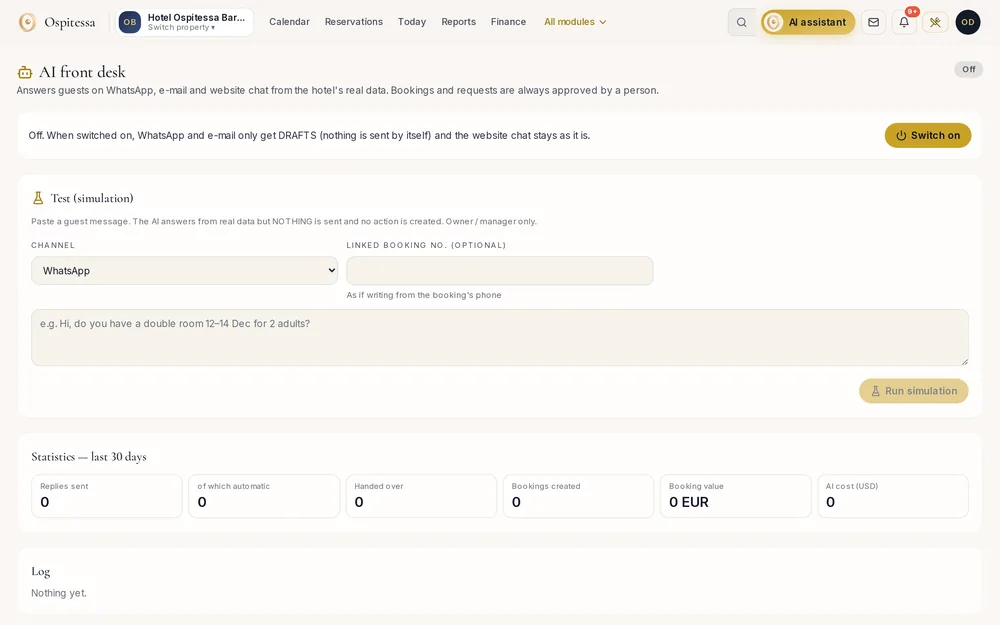
Guests write on Booking.com at any hour: what time is check-in, where can they park, is breakfast included. Ospitessa reads the message, sees the booking and prepares the reply from your house rules, in the guest's language.
What it does
Messages received on Booking.com arrive in the Ospitessa Inbox, next to the booking. The AI answers the everyday questions: check-in and check-out times, parking, breakfast, directions, pets, room facilities.
The reply goes back on Booking.com, in the guest's conversation, like any message from your property.
Draft or automatic
You choose how the AI works on Booking.com: it prepares drafts that the front desk sends with one click, it answers simple questions on its own, or it is off. You can start with drafts and switch on automatic replies once you have seen how it writes.
What it leaves to the front desk
Cancellations, date changes, payments, special requests and complaints do not get an automatic reply. They reach the front desk, flagged, in the same list.
Messages that go out on their own
Besides replies, Ospitessa sends the confirmation, arrival instructions, the welcome message and the check-out message at the right time, each with the details of the booking.
How to choose a chatbot for Booking.com
There are standalone messaging tools that plug into the channel manager you already have, and there are property management systems with AI built in. Ospitessa is the second kind: channel manager, booking calendar, invoicing and AI on guest messages in one program.
Whichever you choose, ask: does it connect to Booking.com officially or by copying messages, does it see the guest's booking, can you approve replies before they are sent, and who handles cancellations and payments.
Questions about AI chatbot for Booking.com
Does it work for apartments and guesthouses?
Yes. What matters is that the property is listed on Booking.com and connected through the Ospitessa channel manager, whatever its size.
Can the AI cancel or change a booking?
No. Cancellations, changes, payments and complaints go to the front desk. The AI only answers information questions.
Which language does it reply in?
In the language the guest wrote in: English, German, Italian, French, Spanish and the other common languages.
Can we check every reply before it goes out?
Yes. In draft mode the reply waits in the Inbox and the front desk sends or edits it. Automatic replies are switched on only when you choose.
What is needed for it to work?
The platform must be connected through the Ospitessa channel manager. We set up the connection together during onboarding.
Related features
Guests & communicationAirbnb auto-replyAI auto-reply for Airbnb messages: arrival, parking, door codes and check-out, in the guest's language, as a draft or automatically, linked to the booking.See the featureGuests & communicationAI for Expedia messagesAI for Expedia guest messages: replies from your house rules, in the guest's language, in the same Inbox as Booking.com, Airbnb and WhatsApp.See the feature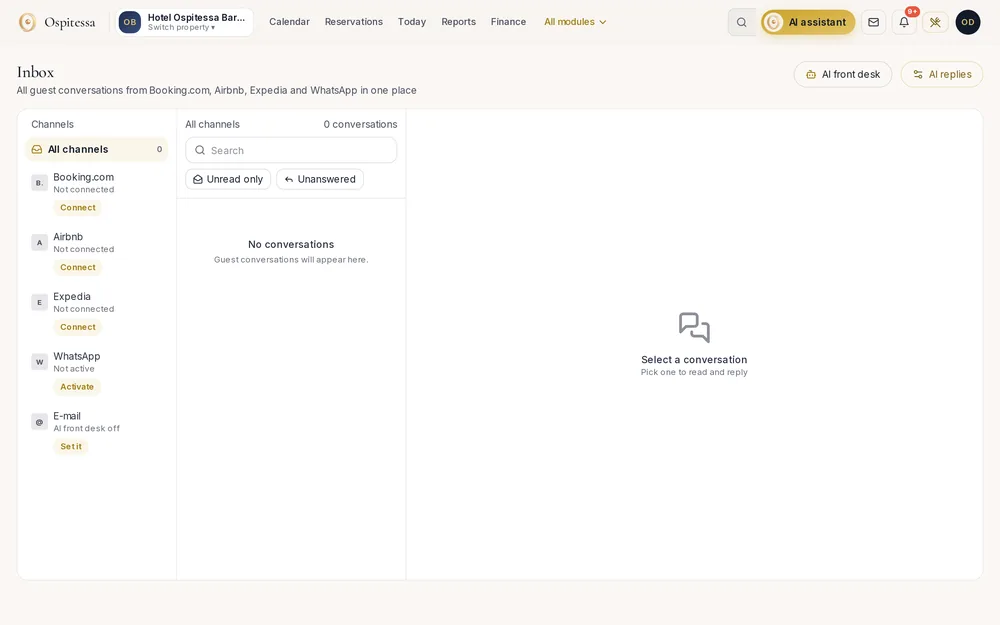 Guests & communicationUnified inboxMessages from Booking.com, Airbnb, WhatsApp, your website chat and email in one inbox, with replies drafted by AI.See the feature
 Online salesChannel managerAvailability and prices sent automatically to Booking.com, Airbnb, Expedia, Agoda and 70+ partners.See the feature

See Ospitessa on your own rooms.
In a 30-minute demo we show you the calendar, the channel manager and the AI receptionist set up for your property.